FeedYourHead

My personal hacks, tweaks, and ideas concerning just about anything that can be plugged in a wall, taken apart, or put back together

12/19/2014

Control a PC from Android Wear

So I'm now the proud owner of an LG G Watch.  After reading all the flame wars on whether Android Wear was the greatest thing since sliced bread or the worst thing since un-sliced bread I decided to be conservative and opted for a first gen watch before dropping too much cash on the "newest-greatest".  I'm not going to add to the already gigantic pile of Wear reviews, suffice to say I'm satisfied with it for what it is and what I paid for it.

But that's not the point of this post.  90% of the reason I bought the watch wasn't for what it did, but rather what can I make it do???  So I got it, rooted it, and started sideloading apps (xda).  What I ended up with was an android smartwatch that could:
  • Play a movie (QQPlayer + ES File Explorer + Bluetooth Headset)
  • Run an NES Emulator (NES-FC Lite + Bluetooth controller)
  • Open my garage door (V1_Bluetooth_Arduino app + my bluetooth/arduino garage door setup)
None of these were really way out there as far as plausibility so I continued my hunt to push the limits of what this thing can do.

The one place I feel Android Wear falls short is the 'control' aspect of things.  It is a fantastic little devices for providing you with information, but at the end of the day I should be able to tap the thing on my wrist to control my every day life.......

The closest thing I could find right now is the IFTTT integration.  Bravo in general to this website and moreso for making it compatible with wear.  They get it.  Tap a button to cause an action somewhere in the real or digital world.  

So after playing around with existing recipes (https://ifttt.com/android_wear) I remembered a post I saw a while ago about controlling your computer with IFTTT and Dropbox vis SMS.

http://www.makeuseof.com/tag/how-to-issue-a-command-to-your-computer-with-a-text-message/
Read more »
Posted by wolfebaine at 4:05 PM No comments:
Email ThisBlogThis!Share to XShare to FacebookShare to Pinterest

8/07/2014

LighTouch - Phase II

DESCRIPTION
LighTouch is the second iteration of a prototype I 'completed' about a year ago - LighTouch - Phase I . The premise is simple: a fully functional streaming radio/alarm clock that uses hand gestures as the sole interface and no physical contact with the device. 

Playback, volume, and track changing are controlled by waving your hand above the device. 

The two primary components to accomplish this are simply a raspberry pi and an ultrasonic sensor. Everything else is just for flair! 

Full how-to and code is available at: Hackaday.io - LighTouch


More after the break

Description

LighTouch is meant to be a general control interface for non-visual medium (music in this case, but there are many other applications).  The idea behind the project is to make playing and controlling your music as simple as waving your hand.  The code is designed to interpret input from the ultrasonic sensor and use that information to control music playback.  
One of the first applications for this project is as a bed-side alarm clock.  The idea of which being rather than trying to fumble for a 'snooze' button, turning off your alarm is as simple as waving your hand over the clock.  
The controls are highly configurable, but in it's current state it's configured using MPD (pianobar is also working).  
To control the unit there are set distance criterias.  For instance there is a "ceiling" (the maximum distance the sensor will read input) set to 80cm.
Other such criterias are as follows:
0-10cm - Pause (LED off)
10-45cm - Volume control 0%-100% (LED brightens/dims)
46-69cm - DEAD ZONE (to prevent accidentally skipping to the next track when raising the volume....LED fully on)
70cm-80cm - Next Track (led will blink 3 times)
>80cm - Ceiling (no action taken)
In addition, I've also added an LCD screen to show current "Now Playing" information as well as volume level and an Ultrabright LED that fades depending on the volume level.

COMPONENTS
  • QUANTITY COMPONENT NAME
    1×Raspberry Pi (final and tutorial build)
    1×16x2 LCD Display (final build)http://osepp.com/products/shield-arduino-compatible/16x2-lcd-display-keypad-shield/
    1×Pi Alamode (final build)http://www.makershed.com/products/alamode-for-raspberry-pi
    1×HC-SR04 Ultrasonic Sencor (final build)https://www.bananarobotics.com/shop/HC-SR04-Ultrasonic-Distance-Sensor?gclid=Cj0KEQjw6deeBRCswoauquC8haUBEiQAdq5zh-lW78tsyO0Vw-OGO0Tpa8D2Kt0VO37wZwWF8RpF3DYaAk0R8P8HAQ
    1×10mm Ultra-High Brightness Blue LED (final build)http://www.radioshack.com/product/index.jsp?productId=3111495
    1×Case (final build)
    1×Arduino Menta (tutorial build)
    1×Parallax Ping))) (tutorial build)
    1×Any, old LED (tutorial build)
    1×Breadboard (tutorial build)
    1×FTDI cable (tutorial build)

Posted by wolfebaine at 8:27 AM No comments:
Email ThisBlogThis!Share to XShare to FacebookShare to Pinterest

3/09/2013

LighTouch

LighTouch was an idea I had as I was just diving into Arduino.  Like anyone getting started, I bought an Uno and three random shields just to play with (music shield, bluetooth, and ultrasonic range finder).  To that end, I got each of them up and running in record time and got bored.  So what was the next logical step?  Right... figure out how many of these shields can I use at the same time.  In this case, a music shield and ultrasonic range finder made the cut.

The idea is pretty simple; an mp3 player that you never have to touch.  Simply hold your hand over the device to adjust volume, pause, and move to the next track.  All the commands basically key on the distance of your hand from the sensor.

A little modification of the demo code for both, some enclosure work, and before i knew it I had a pretty functional little prototype.

Update:
Here's the current control scheme:

0-7cm = Pause (LED OFF)
7-30cm = Lowest Volume->Highest Volume (LED DIM)
30-50cm = Highest Volume (LED ON)
50-55cm = Next Track (LED OFF then ON)

So basically the setup works based on your hand's distance from the sensor with feedback given by the LED so you know where you are in the control scheme.  There's 'dead zones' setup to avoid accidentally moving from volume mode to next track.  For instance, once you're at the max volume (30cm) , there's a +20cm dead zone until you hit the next track and the LED turns bright so that you know you're at the max volume.

Whenever you move your hand away, and the distance becomes 'infinite' (ie, the ceiling) it locks in the last distance it recorded for your hand.  So basically you move your hand to the volume you want, then slide your hand off to the side to lock it in.

To pause, move your hand close to the sensor until the LED turns off, then slide your hand away.
To change volume you raise your hand up or down while the LED is dimly lit, until it's brightest (then you're at max volume)
Once you're at max volume, you can pop your hand up, watch for the LED to turn off, then back down to move to the next track (then you're back in volume mode, or just move your hand off to the side).


I plan on expanding on this idea.  Ultrasonic proves to be a very simplistic, but very precise user interface for just about everything I've tried it on.

What's next?  An alarm clock that I can just wave my hand over to shut it off.

assembly pictures after the break:

Read more »
Posted by wolfebaine at 9:26 PM 5 comments:
Email ThisBlogThis!Share to XShare to FacebookShare to Pinterest

9/17/2012

Project Gemini - Phase 1 - XBMC (complete)

Backstory 

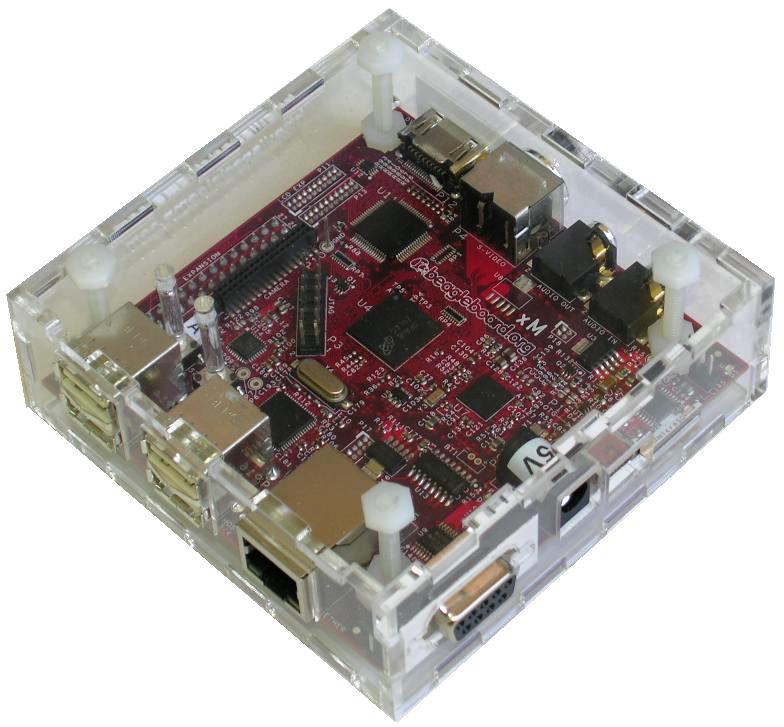
If you're reading this post than you are probably where I was a couple of months ago.  You wanted to jump on the bandwagon of the single board, SOC craze and ran out and bought a Beagleboard XM (rev C in this case).  You did this not because you're a developer or a potential product manufacturer but you thought the idea of a 1Ghz computer that fits into the palm of your hand is just plain AWESOME.  You got it in the mail, opened it up, plugged it into your TV, and played with the demo image for 5 full minutes before going "ok, what else can I do with this?"


Then you started researching (and perhaps started secretly wishing you bought a Pandaboard or RasPi due to the overwhelming amount of prebuilt software/support available).  You spend hours sifting through Google Groups, forums, and blogs only to find that there are hardly any detailed 'how-tos'. Or even worse, only brief glimpses of people who are facing the exact same issues you are or the occasional, "I HAVE AN ISSUE"........."NEVERMIND.  I FIXED IT" with nothing explanation as to how....


So I decided that I could either be part of the problem, or part of the solution.  These posts won't contain issues or 'work in progress'.  These will be detailed how-to's on how myself and my partner in crime plan on turning a Beagleboard XM rev C into a "Swiss Army Knife" of portable computing.  Each 'phase' will basically be it's own 'sdcard' to swap out at will depending on what you want to accomplish.

Upcoming Projects:

Phase 1 - XBMC

  • Phase 1.5 - XBMC - CarPC
  • Phase 2 - Full Android System (rooted, google apps, etc)
  • Phase 3 - Wireless Webcam Monitoring System (mjpegstreamer, lighttp)
  • Phase 4 - Headless Music Server (MPD, lighttp)
  • Phase 5 - OpenWRT Wireless Router


Phase 1 - XBMC 

The first time I saw this little board my mind immediately jumped to using this thing as a replacement for my CarPC.  While that process is ongoing, the majority of my time was spend just getting Angstrom, SGX, and XBMC to play nicely.  Here is EXACTLY how to get XBMC running on your Beagleboard XM rev C (as long as you already have some basic knowledge of Linux).

(continued after the break)

Read more »
Posted by wolfebaine at 11:21 AM 11 comments:
Email ThisBlogThis!Share to XShare to FacebookShare to Pinterest

12/04/2011

$15 (easy) Water Detector

Premise
After the slew of hurricanes and tropical storms that plagued the east coast this year, I think just about everyone became aware of 'flooding basement syndrome'.  I certainly did.  And, in accordance to Murphy's Law, the flooding MUST begin at 3am when you are soundly asleep in bed then continue to flood until you wake up the following morning to a brand new indoor pool.  The second night is even better.  You've learned your lesson and you're prepared for the worst.  Unfortunately, all this results in is you standing there at 1am staring at a sump pump float for hours, performing your own scientific field test of the adage 'what goes up....must come down' and each time praying that it does.

Around hour 3 of this, it occurred to me that this is the 21st century!! I should just be alerted to the fact that my basement is flooding while I'm sound asleep by some device with the voice of Pierce Brosnan!!

As with most good ideas at 3am, I completely forgot about it.  Then I recently saw this post on Make for a $25 water detector which reminded me.  I thought I'd take my own spin at a simplified method.  So here it is.....might not be a soothing voice to awake you (yet), but it will definitely get the job done...


What you'll need

  • A battery operated smoke detector ($7)
  • a large PVC coupler ($6)
  • a large sponge ($1)
  • A SPST switch ($1)
  • wire
  • a soldering gun
  • glue


How it works


It's pretty simple and should only take you a good 30 minutes to put together.  Basically, your highjacking the 'test button' that's present on any smoke alarm by attaching to leads to the PCB that go down into a sponge that's at ground level.  When water saturates the sponge it completes the circuit causing the alarm to sound (and yes, the smoke detector still works too...as I quickly found out while soldering).

(see the rest after the break)

Read more »
Posted by wolfebaine at 8:47 PM 19 comments:
Email ThisBlogThis!Share to XShare to FacebookShare to Pinterest

8/22/2011

USB Webcam Microscope

Not everthing I do is original.  This just seemed like a cheap fun project.

http://blog.makezine.com/archive/2011/07/weekend-projects-usb-webcam-microscope.html

Only took about an hour and I'm fairly impressed with the results


my hair
the table it was sitting on


Posted by wolfebaine at 11:42 AM No comments:
Email ThisBlogThis!Share to XShare to FacebookShare to Pinterest

Project - AlarmTock

Backstory - I don't know why this didn't occur to me sooner, but once again my wife comes to the rescue in inspiring my creativity.  You see, I've had the same same Sony alarm clock since 1992.  The damned thing still has a tape deck in it!!  I never really gave it much thought because I only stared at the thing once a day for 3 seconds, and that was to turn it off.  My wife absolutely hated it though.  It sounded terrible and looked even worse.  So she went to target and picked me up a $10 alarm clock that at least looked like it belonged in the 21st century.  I stared at it for about 30 seconds before asking myself "Why am I limited to waking up to a radio station that could be playing a song I absolutely hate or the most annoying BEEEEEP sound imaginable? Why doesn't my alarm clock tell me exactly what I need to know in the morning?"

Based on some other projects I've been working on (BlueBell), I used the idea of rss-driven text to speech combined with cron job built on a Chumby Hacker Board, crammed it inside a cheap alarm clock and Viola!  Enter the AlarmTock.


After the break you can here a quick sample of the output.  It's not quite Tony Stark's 'Jarvis' yet, but it's a step in the right direction.  Currently only does weather and top headlines, but I'm working on Facebook updates, personalized TV lineups, and todo lists.

(more after the break)

Read more »
Posted by wolfebaine at 11:23 AM 3 comments:
Email ThisBlogThis!Share to XShare to FacebookShare to Pinterest

Musicbox V2

This is simply a revamp of my previous wireless jukebox setup posted here http://wolfebaine.blogspot.com/2010/06/project-musicbox-portable-hidden-and.html

Nothing more to say really.  I just wanted something that had a little more polish and looked very unobtrusive when stowed away.


Posted by wolfebaine at 10:40 AM No comments:
Email ThisBlogThis!Share to XShare to FacebookShare to Pinterest

7/14/2011

(UNDER CONSTRUCTION) BlueBell - The household audible alert system


What is BlueBell?

BlueBell is the evolution of one of the last, untapped pieces of technology in your household; the doorbell.  Your doorbell is probably the only audible alert system heard throughout your entire house yet it is limited to a single sound and triggered by one physical button.  BlueBell seeks to improve upon this antiquated technology by transforming your doorbell into an household audible informational system that requires as little physical intervention as possible.  BlueBell takes the traditional doorbell to it's logical extremes by incorporating wifi, bluetooth, and audio to bring you, the homeowner, a limitless notification system.

(in these examples, John and Marsha are the home owners and Eric and Trent are the guests)
  • Bluetooth Doorbell 
    • Personalized Indoor Notification System
      • The system will announce a guest by name before they even arrive at the door
      • UNDER DEVELOPEMENT: The system will also notify the homeowner via SMS at the same time
        • Example:  "Eric and Trent have arrived"
    • Personalized Outdoor Greeting System
      • The system will greet a known guest by name and alert them as to whether whether or not one more more of the homeowners are currently present
      • UNDER DEVELOPEMENT: The system will also notify the homeowner via SMS at the same time 
        • Example 1: "Welcome Eric and Trent.  John and Marsha are home and will be with you shortly"
        • Example 2: "Welcome Eric.  No one is currently home but they have been alerted to your presence "
  • Generally Interactive Realtime Vocal Information System (GIRVIS) (ha! can't sue me now!!)
    • The Arrival System
      • A personalized audible reading of live internet-based information designed to operate when you return to your house
        • Example: "Welcome home, John.  The current temperature is 88 degrees and mostly cloudly.  The forecast for tonight is clear.  You have 8 unread emails and 9 facebook notifications. Here are the tops stories in the news...."
    • UNDER DEVELOPMENT: The Departure System
      • A personalized audible reading of live internet-based information designed to operate as you leave your house
        • Example: "Marsha today you have a doctor's appointment at 11:30.  Don't forget to pick up your drycleaning before 9pm.  There is currently and accident on I-81 northbound at mile marker 100.  Today's forecast calls for an 80% chance of rain."
  • Remote Controlled Wireless Music System (via MPD)
    • Wireless Jukebox
      • By utilizing the thousands of MPD clients available (from web browsers to iphone and android apps) your doorbell becomes a household jukebox system that be controlled by any person on your wireless network.
    • COMING SOON!! Bluetooth Party Mode
      • A dynamically shifting music playlist based on the presence of known individuals.  The program will detect who is present at a party and automatically shift the genres of music according to user-defined likes and dislikes.  The system will also work in tandem with The Personalized Indoor Notification System to pause a live playlist, announce the arriving party instantly start playing their user-defined 'theme song'.
  • COMING SOON Wireless web-accessible CCTV system (via usb webcam) 
How does BlueBell work?
BlueBell operates by utilizing one of the most commonplace of all wireless protocols; Bluetooth.  Bluetooth exists on over 90% of all cell phones and since Bluetooth is designed to work over relatively short distances (30 feet or so) and each bluetooth radio has a unique identifier (it's MAC address) it makes it an ideal candidate for proximity detection.  

These unique identifiers are then compared to a list of known people, a 'Rolodex' of MAC addresses if you will, and executes a certain task based on who has arrived and when.  The output or 'notification' can take form of a spoken voice, and sent text message, playing of a song, or hundreds of other programmable actions.  Basically, if it can be plugged into a wall, then your presence will be able to activate it!

By combining this bluetooth proximity detection with internet access (via wifi) and audio (via text to speech engine or mp3 library), you have real-time access to a world of information that can be delivered to you simply by walking into your house.


How can I get BlueBell in my house?
Bluebell is currently in the development stages and not yet available for distribution.  Our goal is to integrate a low-power platform using a lightweight application structure that is both modular and scaleable.  We currently have a prototype in operation, but are looking to gauge public interest in this project before moving forward with an alpha release.

Until that time, please enjoy this brief video highlighting some of the features BlueBell is currently capable of and the current platform we have chosen to use for the prototype.

[COMING SOON]

Posted by wolfebaine at 2:30 PM No comments:
Email ThisBlogThis!Share to XShare to FacebookShare to Pinterest

2/21/2011

Kitchen PC - Part II

The first bout with a usable kitchen PC consisted of mounting an old Armada E500 laptop within a picture frame.  It's primary purpose was to act as a digital photo frame, but I also tried to squeeze some music, video, and dashboard capability out of it.  Needless to say, the 800mhz processor and 256mb ram had some difficulties accomplishing this task in a pretty, user-friendly desktop style.

So I did what any good repurposer does.  Buy my wife a new laptop and appropriate her old one.  The Acer Aspire ____ had more than enough power to handle Ubuntu 10's netbook frontend and all the streaming video I could throw at it in an ascetically pleasing format.  The entire setup is mouse controlled only.  It still has the slideshow screensaver set to show pictures and I'm using IGoogle as an informational dashboard.

This time, though, instead of trying to mount this in a picture frame, I wanted the system where all the cooking action is (so you can browse through recipe sites, or just watch a movie while cooking).  So I decided to try and under cabinet mount.  This proved to be MUCH easier than an expected.

Step 1 - Flip the resolution vertically on Ubuntu
Step 2 - Mount the laptop under the cabinet using some aluminum ducting tape
Step 3 - Plug in wireless mouse
Step 4 - DONE


Posted by wolfebaine at 11:22 AM 2 comments:
Email ThisBlogThis!Share to XShare to FacebookShare to Pinterest

1/13/2011

Project Vixen

Not so much a how-to, just a record of this year's holiday accomplishment.


Here is our xmas lightshow.  Created via an 8 channel parallel port controller driven by Vixen software.

More after the break:


Read more »
Posted by wolfebaine at 11:26 AM No comments:
Email ThisBlogThis!Share to XShare to FacebookShare to Pinterest

11/03/2010

Google Street View + Treadmill (made easy)

Premise 
I've seen quite a few posts lately around hooking Google Street View up to exercise equipment of some sort.  Most tend to use sensors to detect a passing rotation.  I love the idea, but not enough to spend the time or money necessary to make it a reality.  So I improvised.


What you need:

  • Treadmill
  • TV, projector, or mounted display (maybe next time)
  • a Stealth Switch (actually, any momentary button would work....middle button on a mouse for instance)
  • a long usb cable (probably)
  • Autohotkey
  • Google Street View


(more after the break)

Read more »
Posted by wolfebaine at 11:09 PM 4 comments:
Email ThisBlogThis!Share to XShare to FacebookShare to Pinterest

10/10/2010

Project DeepThought ($320 CarPC)

Backstory - 

Five years ago I had a 2003 Chevy Cavalier, and I was bound and determined to stuff a PC in it.  The first incarnation was beautiful in function, not in form.  I had a 7" in-dash motorized touchscreen LCD (that didn't quite fit in the console) and a Compaq E-42 mini PC (now being used in Project Musicbox) stuffed in the glove compartment (the door didn't shut, so the door had to go).  It worked beautifully, but eventually the LCD went out and the PC was never nearly powerful enough to do what I wanted it to.  It was around that time that we got a new car, and after the damage I did to the cavalier it took quite a bit of convincing for the wife to let me do it again.  The rules for the 2nd installation were simple:

1) Has to look like it belongs in the car.
2) Has to be quickly removable
3) Has to not look 'geeky'

So by the time I got around to this project my wife and I brought our little bundle of joy into the world.  With that, I had to add a forth condition to the list.

4) Cheap!!!

I easily spent over $600 on my last CarPC endeavor and now I had to try to cram function, form, and financial responsibility into an '02 Acura RSX

The Solution:


A quickly removable, simply controlled, fewest cords as possible CarPC (otherwise known as DeepThought).  This knob controlled system can play video, music, and launch external programs (such as GPS, SNES emulator, internet browser, etc).


(more after the break)

Read more »
Posted by wolfebaine at 11:54 AM 2 comments:
Email ThisBlogThis!Share to XShare to FacebookShare to Pinterest

7/02/2010

How to get free SMS (on your work restricted phone)

Backstory - I've had a work phone for years now, to the point where I don't have a personal cell.  The company has an unlimited voice and data plan, but (smartly) no sms messaging.  This comes at great frustration to my friends in that they wonder why I'm never privy to the plans they've already made.  To which my response is constantly "I can't get texts!".

So then Google Voice goes public, and now all is right with the world.

What you need 

-A cellphone with email capabilities (IMAP or POP3)
-A Google Voice account (and gmail address)

What you do 


-Sign up for a Google Voice account and get your new phone number
-Enter your contacts' phone numbers in Google Voice
-Goto Google Voice Settings -> Voice Settings -> Voicemail & Texts
- Check Text Forwarding
-Setup your gmail account on your mobile phone (IMAP works best because it's instant delivery)
-Send a text to all of your friends from the Google Voice account saying something like "It's me, save this number in your phone as [Name]Text."
-When they respond it will forward to your gmail account

Result:
Now you have a phone number dedicated to just text messaging which will instantly forward to your gmail account and thus, to your phone.  When you receive the text you can just reply to the email and it will automatically forward to their phone as SMS.
Posted by wolfebaine at 7:27 PM No comments:
Email ThisBlogThis!Share to XShare to FacebookShare to Pinterest
Labels: blackberry, google voice, sms, tether

6/27/2010

Project MusicBox - Portable, hidden, and wireless sound system


Update-V2 has been posted here: http://wolfebaine.blogspot.com/2011/08/musicbox-v2.html

Backstory - I'm a recent homeowner and the one of the things I was most looking forward to in owning a house was, of course, geeking it out.  After getting everything pretty well in order (you'll see in some other posts) I turned my attention to the back deck and yard.  I have a substantial music collection and the idea of controllable music from every room in the house and even outside the house is the long term goal.  What I wanted was a permanent (or at least semi-permanent) outdoor PC that was running wireless and had access to my server where my music was stored.  Then I wanted to control that system with some kind of handheld (I'm using a Nokia N700, but any cell phone with wireless would work).  Under just those terms I would've had this project done in an hour.  There'd be wires everywhere and some unsightly speaker system nailed to the siding.   However, with the house came a wife.  And the wife insists (and rightly so) that whatever I create that is in or around the house must be ascetically pleasing.  Were it not for that direction, I probably never would've came up with this idea.  So, thanks honey!
(more after the break)

Read more »
Posted by wolfebaine at 12:02 PM No comments:
Email ThisBlogThis!Share to XShare to FacebookShare to Pinterest
Labels: home, linux, mpd, project musicbox

6/22/2010

Turn your numeric keypad into a mouse/full keyboard

Backstory - The touchscreen in my CarPC died (more on that later).  As such, I needed a quick replacement for control and a mouse was not a good option for the car.  I had a spare USB keypad and used AutoHotkey to emulate a mouse (when the numlock's off) and a cellphone-type keyboard (when the numlock's on).  This works fine on a standard keyboard as well (I used the mouse portion for my HTPC)


(more after the break)

Read more »
Posted by wolfebaine at 11:44 PM 2 comments:
Email ThisBlogThis!Share to XShare to FacebookShare to Pinterest
Labels: autohotkey, mouse, numpad, smallest keyboard/mouse, windows

6/17/2010

Here we go...

I've decided to do this for a couple of reasons.

  1. I have had/will have alot of fun doing each of these things and figure someone else in the world might also
  2. Great place to keep track of my many many projects (if I can stick to updating this consistently)
  3. Show my daughter someday why her daddy spent the better part of her childhood in a basement with a soldering iron
  4. Help! Please if see I'm doing something wrong or can suggest a better method, don't hesitate to contact me!
So, let's get started. Here are a few of the projects I will be posting (retroactively). It might help motivate me a little more to do some 'how-to's' of the work I've already done. On the hit list:

  • Bluetooth Doorbell (customizable doorbell based on bluetooth MAC address)
  • $320 carpc
  • Headless outdoor jukebox (controlled by tablet, phone, anything with wifi)
  • KitchenPC (laptop running linux built in a picture frame for keyboardless operation)
  • Original XBOX softmod
  • Numpad Keyboard/Mouse (script that turns just the numpad into a keyboard/mouse combo)
...let the fun begin

Posted by wolfebaine at 10:51 PM No comments:
Email ThisBlogThis!Share to XShare to FacebookShare to Pinterest
Newer Posts Home
Subscribe to: Posts (Atom)

Back In Time

  • ▼  2014 (2)
    • ▼  December 2014 (1)
      • Control a PC from Android Wear
    • ►  August 2014 (1)
  • ►  2013 (1)
    • ►  March 2013 (1)
  • ►  2012 (1)
    • ►  September 2012 (1)
  • ►  2011 (7)
    • ►  December 2011 (1)
    • ►  August 2011 (3)
    • ►  July 2011 (1)
    • ►  February 2011 (1)
    • ►  January 2011 (1)
  • ►  2010 (6)
    • ►  November 2010 (1)
    • ►  October 2010 (1)
    • ►  July 2010 (1)
    • ►  June 2010 (3)

Popular Posts

  • $15 (easy) Water Detector
    Premise After the slew of hurricanes and tropical storms that plagued the east coast this year, I think just about everyone became aware of...
  • Project Gemini - Phase 1 - XBMC (complete)
    Backstory   If you're reading this post than you are probably where I was a couple of months ago.  You wanted to jump on the bandwagon...
  • Google Street View + Treadmill (made easy)
    Premise  I've seen quite a few posts lately around hooking Google Street View up to exercise equipment of some sort.  Most tend to use ...

Subscribe To

Posts
Atom
Posts
All Comments
Atom
All Comments
Picture Window theme. Theme images by enot-poloskun. Powered by Blogger.